Thursday, 7 March 2013

How to do case sensitive comparision in SQL server

Case sensitive string comparison can be done using collation in WHERE statement or by specifying collation for column.

See below example which uses COLLATE keyword while comparing two string values in WHERE clause. This example uses SQL_Latin1_General_CP1_CS_AS. If your data is not in English, then choose appropriate collation.

CREATE TABLE testUserTable (Username VARCHAR(30), pwd VARCHAR(30))

INSERT INTO testUserTable(Username, pwd)
      VALUES('User 1', 'PassWord1'), ('User 2', 'PassWord2')

DECLARE @username VARCHAR(30)= 'User 1'
      ,@pwd VARCHAR(30)= 'password1'

--Query 1: This query will return result
SELECT *
FROM testUserTable
WHERE Username = @username
      AND pwd = @pwd

-- Query 2: This query will not return result
SELECT *
FROM testUserTable
WHERE Username = @username
      AND pwd = @pwd COLLATE SQL_Latin1_General_CP1_CS_AS

DROP TABLE testUserTable

First SELECT query will return result even if password is supplied in lower case. Second query will not return any record, which is actually what we wanted in this particular case.

Here in our example we have specified _CS_ (case sensitive) in our collation selection. This behaviour can be reverted to previous by setting it to _CI_ (case insensitive). This will give use the same result as we get in Query 1 because default collation setting in _CI_.

See below CREATE statement which uses collation while creating table.

CREATE TABLE testUserTable (Username VARCHAR(30), pwd VARCHAR(30) COLLATE SQL_Latin1_General_CP1_CS_AS)

In this case we don’t have to specify collation in where clause. Both SELECT queries will give the same result.

Monday, 25 February 2013

Delete duplicate records from MS SQL table using CTE and window function

I work for data company which receives data from many third party data providers. These data often comes with duplicate records. so while I import them to our database, I ofter has to run de-duplication on those data. I have tried many de-deuplicate methods. Here I would like to share those methods.

To see those method lets take some example data. It is City data. I have simplified this data to contain only few columns.  Use below script for sample data.

CREATE TABLE City(CityName VARCHAR(100), CityCode VARCHAR(100), County VARCHAR(100), Country VARCHAR(100), CreateDate DATETIME)
       
INSERT INTO City(CityName, CityCode, County, Country)
      VALUES ('London', 'LN', 'n/a', 'England', '2013-02-25 15:08:00')
                  ,('London', 'LN', 'n/a', 'England', '2013-02-25 15:09:00')
                  ,('Liverpool', 'LP', 'Mersyside', 'England', '2013-02-25 15:10:00')
                  ,('Liverpool', 'LP', 'Mersyside', 'England', '2013-02-25 15:11:00')
                  ,('Liverpool', 'LP', 'Mersyside', 'England', '2013-02-25 15:12:00')
                  ,('Oxford', 'OX', 'Oxfordshire', 'England', '2013-02-25 15:13:00')
                  ,('Oxford', 'OX', 'Oxfordshire', 'England', '2013-02-25 15:14:00')
                  ,('Oxford', 'OX', 'Oxfordshire', 'England', '2013-02-25 15:15:00')
                  ,('Oxford', 'OX', 'Oxfordshire', 'England', '2013-02-25 15:16:00')
                  ,('Glasgow', 'GL', 'n/a', 'Scotland', '2013-02-25 15:17:00')
                  ,('Glasgow', 'GL', 'n/a', 'Scotland', '2013-02-25 15:18:00')


Now lets see the methods to de-duplicate these data.


1) Most simple method is to load data in staging table and use DISTINCT to select the unique records.
CREATE TABLE City_temp(CityName VARCHAR(100), CityCode VARCHAR(100), County VARCHAR(100), Country VARCHAR(100), CreateDate DATETIME)

INSERT INTO City_temp(CityName, CityCode, County, Country)
SELECT DISTINCT CityName, CityCode, County, Country FROM City

TRUNCATE TABLE City

INSERT INTO City(CityName, CityCode, County, Country, CreateDate)
SELECT CityName, CityCode, County, Country, GETDATE() FROM City_temp
  
 These will work without CreateDate field, but if we have to select the createDate also then you have to use aggregate function like MIN/MAX.

INSERT INTO City_temp(CityName, CityCode, County, Country, CreateDate)
SELECT CityName, CityCode, County, Country, MAX(CreateDate) AS CreateDate FROM City GROUP BY CityName, CityCode, County, Country


2) Use temp table with Id column with IDENTITY and select records with MIN/MAX value of Id

     
CREATE TABLE City_temp(Id INT IDENTITY(1,21), CityName VARCHAR(100), CityCode VARCHAR(100), County VARCHAR(100), Country VARCHAR(100), CreateDate DATETIME)

INSERT INTO City_temp(CityName, CityCode, County, Country, CreateDate)
SELECT CityName, CityCode, County, Country, CreateDate FROM City

TRUNCATE TABLE City
INSERT INTO City(CityName, CityCode, County, Country, CreateDate)
SELECT CityName, CityCode, County, Country, CreateDate
FROM City_temp  AS A
      INNER JOIN (SELECT MAX(Id) AS Id FROM City_temp GROUP BY CityName, CityCode, County, Country) AS B
            ON A.Id = B.Id


3) This is the most effective method so far I found, using ETC and ROW_NUMBER() window function. Use below query to delete the duplicate records.

;WITH T
AS (SELECT *, ROW_NUMBER() OVER (PARTITION BY CityName, CityCode, County, Country ORDER BY CityName, CityCode, County, Country) AS RowIndex
FROM City )

DELETE FROM T WHERE RowIndex > 1


This method is fast of above 2 methods becuase it does all processing in memory there is no need to wirte data to temp table.  Please not here that processing in memory only happen if SQL server has enough memory to process these data, otherwise internally it wirtes data to tempdb.

 I hope this will be useful. Please feel free to comment if you find any other more effective method to remove duplicate records in SQL server.


Free E-Books from Microsoft on SQL Server 2012

Microsoft giving away some usefull E-books for free on various SQL Server topics. These books are available on Microsoft Technet website. Those are available in various formats (EPUB, MOBI and PDF). You can download using below links.

Here is the current available book list.


E-Books are aslo available for other technology. Please see below link for other available books.


MS SQL Server 2012 | Free E-Books | SQL Server 2012 Books | Learn SQL Server | Microfot SQL Server Tutorials | MS SQL Server BI Tutorials

Thursday, 21 February 2013

Script to get current running query from Stored Procedure / Trigger / Function

I have written small script which gives you the current running query from stored procedure, trigger or function. Working on big database processing I ofter come across stored procedures (SPs) which takes hours to complete. These SPs has many small queries (INSERT/UPDATE/DELETE/MERGE) or call to other SP or call function. Mostly I use RAISEERROR WITH NOWAIT or PRINT to know the progress of SP but there are some instances where I cannot change SP to add progress reporting statement. So wrote below script to know the current running query. It is very useful to know current running query and helped me in many data processing problems.

SELECT
  SUBSTRING(B.[text]
           , (A.statement_start_offset / 2) + 1
           , (((CASE WHEN A.statement_end_offset <= 0 THEN DATALENGTH(B.[text])
                      ELSE A.statement_end_offset END)
                  - A.statement_start_offset) / 2 ) + 1
           ) AS statement_text
FROM   sys.dm_exec_requests A
       CROSS APPLY sys.dm_exec_sql_text(sql_handle) B
WHERE  session_id = 56 --Use you session id here.
GO

Please note that above script will only tells you which query is running, not the actual progress of the query. Unfortunatly there is no way to know the actual progress of the query :(.

You can use Activity Monitor from management studio or use sp_who2 or below query to know the session id

SELECT * FROM sys.dm_exec_requests req
CROSS APPLY sys.dm_exec_sql_text(sql_handle) AS sqltext

Plesae comment if you like this script or if have better script/way or if you find any error in this script or any aditional information about this.

MS SQL 2008 | MS SQL 2008 R2 | MS SQL 2012 | T-SQL | T-SQL Tutorials | Learn T-SQL | | Microfot SQL Server | MS SQL Server Admministration | How to know current running query | How to know current running query from SP

Display data and index space usege for each table in MS SQL

I have came across a requirement to generate regular report to for the data and index space usage for each table as well as for database. So I have wirttern a small script to do it using Sp_spaceused stored procedure. My script is posted below which might be useful to you. If you find useful please comment in comment section. And feel free to post about correction or if you find better script for this. Data and index size in result set is in MB, it can be changed to Bytes/KB/GB using changes in SELECT query at the end. Below script is self descriptive (at least I think so!!!) If you need any help please leave comment.

DECLARE @counter INT
DECLARE @max INT
DECLARE @name VARCHAR(100)
DECLARE @t TABLE (id INT IDENTITY, name VARCHAR(100))
DECLARE @t1 TABLE (name VARCHAR(100), [rows] INT, reserved VARCHAR(100), data VARCHAR(100), index_size VARCHAR(100), unused VARCHAR(100))
DECLARE @t2 TABLE (name VARCHAR(100), [rows] BIGINT, reserved BIGINT, data BIGINT, index_size BIGINT, unused BIGINT)

INSERT INTO @t (name)
SELECT s.name + + '.' + t.name FROM sys.tables AS T INNER JOIN sys.schemas AS S ON S.schema_id = t.schema_id WHERE [type] ='u'
SET @max = @@ROWCOUNT

SET @counter = 1

WHILE @counter <= @max
      BEGIN
      SELECT @name = name FROM @t WHERE id = @counter
      INSERT INTO @t1(name, [rows], reserved, data, index_size, unused)
      EXEC Sp_spaceused @name
      SET @counter = @counter + 1
      INSERT INTO @t2(name, [rows], reserved, data, index_size, unused)
      SELECT @name
            , CAST([rows] AS BIGINT)
            , CAST(REPLACE(reserved, ' KB', '') AS BIGINT)*1024
            , CAST(REPLACE(data, ' KB', '') AS BIGINT)*1024
            , CAST(REPLACE(index_size, ' KB', '') AS BIGINT)*1024
            , CAST(REPLACE(unused , ' KB', '') AS BIGINT)*1024
      FROM @t1


      DELETE FROM @t1
      END 
           
SELECT SUM(reserved)/1024/1024 reserved
      , SUM(data)/1024/1024 data
      , SUM(index_size)/1024/1024 index_size
      , SUM(unused)/1024/1024 unused  FROM @t2
     
SELECT name AS table_name, data_size, index_size, (data_size + index_size) AS total_size
FROM (     
SELECT name, data/1024/1024 AS data_size, index_size/1024/1024 AS index_size FROM @t2
) AS A ORDER BY total_size DESC

MS SQL 2008 | MS SQL 2008 R2 | MS SQL 2012 | T-SQL | T-SQL Tutorials | Learn T-SQL | | Microfot SQL Server | How to calculate data space | How to calculate index space | How to calculate database size

Wednesday, 3 August 2011

SSIS Tutorials : Debugging Data Flow

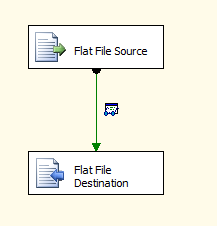
BIDS tool has option to debug the Data Flow control. In normal cases you can see row count while you execute the package in debug mode. And you can see the execution details in progress (Execution Result) tab of the package designer. Apart from this you can see data which is being manipulated in you data task using data viewer. Let's see how to use data viewer in Data Flow task.

Step 1: Define your Data Flow Task. See below image for sample data fow task.


Step 2: Right Click on  Data Flow Path editor as show in below image. And the click on Edit or Data Viewer.


Step 3: Click in on Add  as show in above image. to add data viewer. It will open sceen as shown below to select the type of data viewer you want. For Grid view just click on ok and Ok. It will add one data viewer to your data flow.


Step 4: After adding data viewer you will see small viewer icon along with data flow path.


Step 5: Now run your package to see the data viewer in action. Once you run the package, it will stop at data viewer and will show the records. You will see tree buttons on data viewer. Play, Detach, Copy Data. Click on play to continue exectution with data viewer attached to data flow path. Click on Detach to detach data viewer from execution flow. and Copy Data to copy data in clipboard.


This was short explanation to use data viewer to debug the Data Flow task.


Data viewer can display data in different format. It can show data in grid, histogram, scatter plot and column chart.

Data Grid : It allows column selection, which can later appear as column in tabular data display in debug mode.

Histogram : It only works for numeric column and shows data distribution as histogram.

Scatter plot : This one also only works with numeric data. You can select numberic data column for different axis for the graph.

Chart format: This chart show the occurrence count of discrete values in the selected column.


MS SQL Server Integration Services | SSIS | SSIS Tutorials | Learn SSIS | Beginers Guid to SSIS | Microfot BI Tutorials | Learning SSIS | How to debug package | Debugging Packages | Debugging Data Flow | How to Debug SSIS Package

Saturday, 30 July 2011

SSIS Tutorials : How to Debug SSIS Package

Debugging SSIS package is possible using Business Intelligence Development Studio. There are way of debugging  the different component of package. Data Flow, Control Flow and Script Task can be debugged using different technique.


Debugging Control Flow: Control flow can be debugged using breakpoints, debugging windows and progress reporting.


Debugging Data Flow: Data Flow can be debugged using data viewer and progress reporting.


Debugging Script Task: Script Task can be debugged using break point in script code. It is same as debugging any .Net code debug. 


Apart from above debugging methods you can use different event to write log or send message to know the status of the package execution. Above techniques can only be used while you are executing package using Business Intelligence Development Studio. But if you want to do it on production server (means package which are running out side of development studio), then only way is to generate proper log of you package using package event or adding extra task item in your control flow or data flow.


Next we will see how to use above debugging technique in details in coming blogs. 


MS SQL Server Integration Services | SSIS | SSIS Tutorials | Learn SSIS | Beginers Guid to SSIS | Microfot BI Tutorials | Learning SSIS | How to debug package | Debugging Packages